> ## Documentation Index
> Fetch the complete documentation index at: https://docs.corti.ai/llms.txt
> Use this file to discover all available pages before exploring further.
# Evaluate Speech-to-Text Performance with Tympany
> Use Tympany to create BeWER reports, analyze speech-to-text errors, and recompute WER locally.
Building with speech-to-text does not stop at transcription. You need to know where the model succeeds, where it fails, and whether each difference matters for the workflow you are building.
**[Tympany](https://github.com/corticph/tympany)** is Corti's open source, local-first web app for speech-to-text evaluation. Use it to create [BeWER](https://github.com/corticph/bewer) reports from reference and generated transcripts, review errors in a browser, and recompute error rates after excluding differences that are not true model failures.
Use Tympany when you need to:
Measure word error rate (WER), character error rate (CER), and medical term recall (MTR)
Classify errors as formatting, replacement candidates, context-dependent, or misrecognitions
Identify errors as "meaningful" or systematic (i.e., configuration or reference text anomalies)
Understand the impact of excluding various types of errors in analysis and prioritize fixes
***
## Why WER Is Not Enough
WER is useful, but it treats every word difference equally. Missing a filler word is not the same as missing a diagnosis, medication, dosage, or key symptom. Formatting differences, shorthand, punctuation, and replacement-rule candidates can also inflate WER even when the model captured the intended meaning.
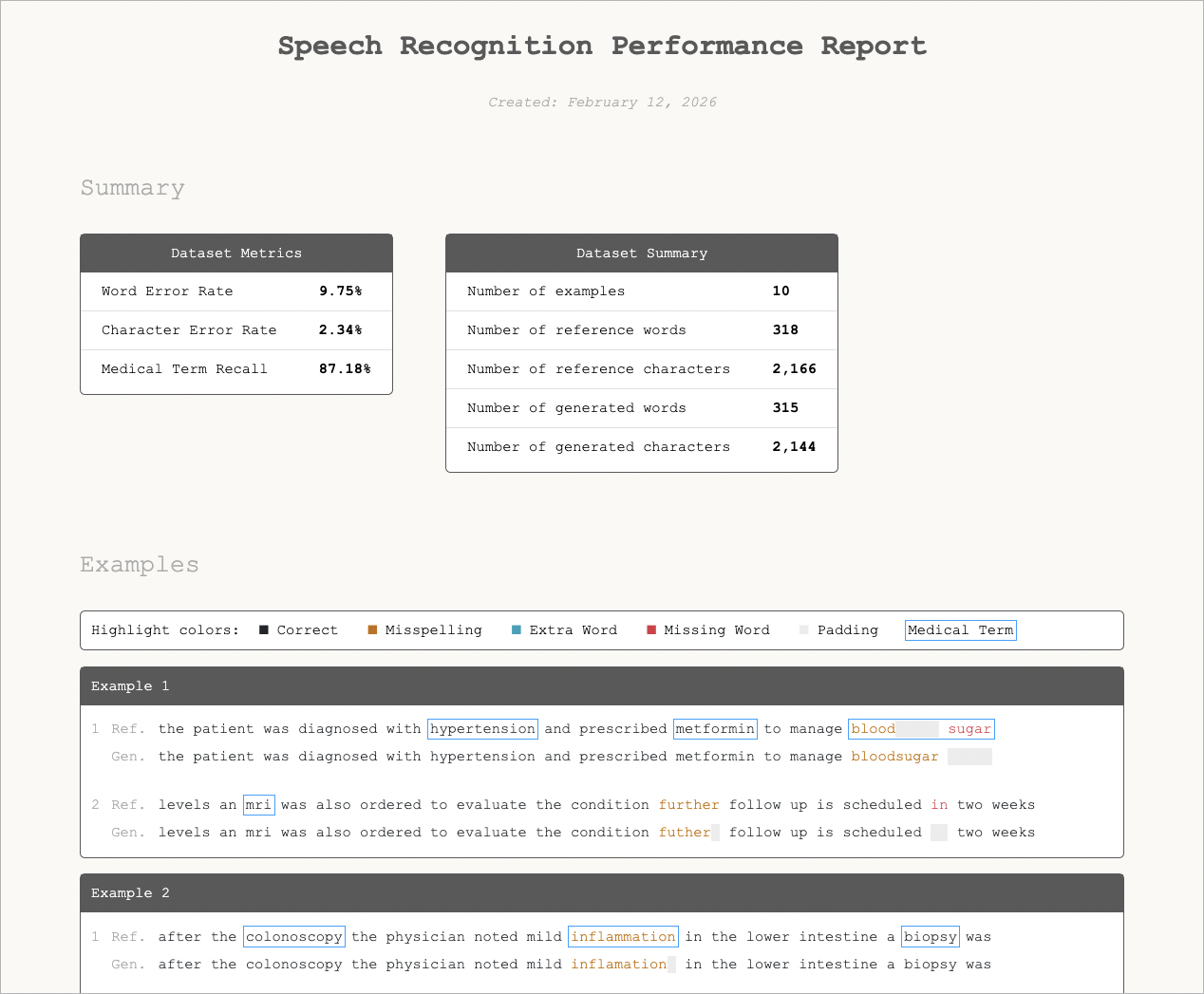
[ErrorAlign](https://arxiv.org/abs/2509.24478) improves this first step by aligning reference and generated transcripts in a way that better matches how a human reviewer compares speech-recognition output. [BeWER](https://github.com/corticph/bewer) uses that alignment to produce reports with WER, CER, optional MTR, and token-level differences that you can inspect.
Tympany wraps this workflow in one local tool. It runs BeWER directly, gives you a web UI for reviewing the report, and lets you decide which differences should count against the model.
***
## Getting Started
Run Tympany locally with `uvx --from git+https://github.com/corticph/tympany tympany`.
The command starts a local web app and opens it in your browser. From there, you can create a new BeWER report or upload an existing report for analysis.
Tympany is designed to run on your machine or in your own single-tenant environment. Transcript data can contain PHI or PII, so local-first evaluation helps you keep sensitive output under your control.
***
## Create and Analyze BeWER Reports
Tympany supports two main workflows:
1. **Create a BeWER report** from pasted text or a CSV containing reference and generated transcript pairs. Tympany evaluates the pairs with BeWER, computes WER and CER, and can compute MTR when you provide a medical term list.
2. **Analyze a BeWER report** in the web UI. Tympany classifies each difference, lets you exclude non-model errors, and re-runs the evaluation so you can see the updated WER, CER, and MTR.
Use this workflow to separate true speech-recognition errors from issues that should be handled elsewhere, such as formatting configuration, spoken command handling, or replacement rules.
 ***
## Understand the Ecosystem
Tympany is the recommended starting point for local review, but it builds on the same evaluation ecosystem that powers the lower-level tools. If you prefer a command-line workflow, [Corti Canal](https://github.com/corticph/corti-canal) can still generate a self-contained HTML report.
Create BeWER reports, analyze errors in a local web UI, exclude non-model differences, and recompute error rates.
Generate Beyond WER reports with WER, CER, optional medical term recall, and token-level alignment details.
Align reference and generated transcripts using an evaluation method designed for modern speech-recognition error analysis.
Use the command-line reporting workflow when you want a self-contained HTML report outside the Tympany web app.
***
## Data Handling and Optional LLM Review
Tympany stores generated reports, analysis history, and saved medical term lists in a local data directory by default. Corti credentials are optional and only enable the LLM second pass. Without them, Tympany still runs the rule-based classification locally.
When Corti credentials are configured, Tympany can run an optional LLM second pass for uncertain errors, such as context-dependent differences or possible misrecognitions. If you host Tympany for a team, put it behind your own access control, such as VPN, SSO proxy, or an IP allowlist.
Tympany's email login scopes local history within the instance. It is not authentication. Do not expose a shared Tympany instance to untrusted users without your own access controls.
***
## What This Enables
Instead of only asking:
> "What is the WER?"
You can answer:
> "Which errors matter, which ones are fixable outside the model, and what is the updated error rate after those differences are excluded?"
See supporting speech-recognition research:
* [Self-Supervised Speech Representation Learning: A Review](https://ieeexplore.ieee.org/abstract/document/9893562)
* [Do We Still Need Automatic Speech Recognition for Spoken Language Understanding](https://arxiv.org/abs/2111.14842)
* [Do End-to-End Speech Recognition Models Care About Context](https://arxiv.org/abs/2102.09928)
* Learn more at [corti.ai/research](https://corti.ai/research)
***
## Understand the Ecosystem
Tympany is the recommended starting point for local review, but it builds on the same evaluation ecosystem that powers the lower-level tools. If you prefer a command-line workflow, [Corti Canal](https://github.com/corticph/corti-canal) can still generate a self-contained HTML report.
Create BeWER reports, analyze errors in a local web UI, exclude non-model differences, and recompute error rates.
Generate Beyond WER reports with WER, CER, optional medical term recall, and token-level alignment details.
Align reference and generated transcripts using an evaluation method designed for modern speech-recognition error analysis.
Use the command-line reporting workflow when you want a self-contained HTML report outside the Tympany web app.
***
## Data Handling and Optional LLM Review
Tympany stores generated reports, analysis history, and saved medical term lists in a local data directory by default. Corti credentials are optional and only enable the LLM second pass. Without them, Tympany still runs the rule-based classification locally.
When Corti credentials are configured, Tympany can run an optional LLM second pass for uncertain errors, such as context-dependent differences or possible misrecognitions. If you host Tympany for a team, put it behind your own access control, such as VPN, SSO proxy, or an IP allowlist.
Tympany's email login scopes local history within the instance. It is not authentication. Do not expose a shared Tympany instance to untrusted users without your own access controls.
***
## What This Enables
Instead of only asking:
> "What is the WER?"
You can answer:
> "Which errors matter, which ones are fixable outside the model, and what is the updated error rate after those differences are excluded?"
See supporting speech-recognition research:
* [Self-Supervised Speech Representation Learning: A Review](https://ieeexplore.ieee.org/abstract/document/9893562)
* [Do We Still Need Automatic Speech Recognition for Spoken Language Understanding](https://arxiv.org/abs/2111.14842)
* [Do End-to-End Speech Recognition Models Care About Context](https://arxiv.org/abs/2102.09928)
* Learn more at [corti.ai/research](https://corti.ai/research)